



















Chatbot testing with "LLM as Judge"

Chatbot testing isn't easy! Software implementing Large Language Models create a huge blast radius when it comes to good test coverage,
every response can vary subtly in tone, structure, and precision.
Traditional testing approaches, and TDD for that matter, rely on fixed assertions. So what then for non-deterministic software?
It leaves us with a very specific technical challenge:
how do you verify generated outputs?
Regex for specific words? NLP entity mapping or checking the length of the output? Maybe we just have to resort to manual testing...
There is an easier solution: when testing a prompt's generated output, just use another prompt!
LLM as judge
The "LLM as Judge" technique uses a prompt to score the output of your chatbot, and it's up to you to craft this prompt. After all, you know what you are looking for.
Judgement prompts can look for one or multiple things. Does it generally answer the question asked? Does it reply in the right tone/manner? Does it answer in the format required? The prompt below is an evaluation prompt for an insurance chatbot assistant, answering policy related questions for end customers. The chatbot itself should reference policy documents where necessary:
You are an expert insurance chatbot evaluator.Given the following user prompt and bot response, answer:1. What documents are referenced in the answer?2. Is the tone appropriate for an insurance helper? Expected tone: {expected_tone}3. Does the bot response capture the general gist: {expected_gist}?Respond ONLY with a valid JSON object in this format:{"doc_reference": string[],"tone": true/false,"gist_match": true/false,"explanation": "..."}User prompt: {user_prompt}Bot response: {bot_response}
The LLM as Judge prompt would then return the following response.
{"doc_reference": ["coverage summary","policy documentation"],"tone": true,"gist_match": true,"explanation": "The bot response appropriately mentions key documents for verifying coverage: the coverage summary and policy documentation. The tone is clear and direct, suitable for an insurance helper, and the response accurately captures the main idea that flood damage is not covered and the user should check the coverage summary for details."}
This output is machine readable and can be displayed as the result of a single test case, or aggregated to a higher level to evaluate general prompt performance.
Test Suite Example code
An example implementation of this "LLM as Judge" approach can be found here blog-llm-as-judge↗.
In this example we test an Insurance Policy chatbot implemented in python against multiple test cases. implement a Judgement Prompt to produce a score around the following requirements:
- Does the general gist of the output match for the input question?
- Is the tone what we expect?
- Have the correct documents been referenced?
A chatbot is implemented in python below and the test cases iterated over to produce a test report.
bot = ChatbotApproach(name='InsuranceBot',system_prompt="""You are a helpful insurance assistant. Provide an answer in a professional helpful tone.When certain documents are relevant to the question being asked, add a reference section at theend of your answer.""",vector_db=vectordb,run_id=run_id,debug_dir=debug_dir)# Run prompts through chatbot and save debug inforesults = []for i, p in enumerate(prompts):user_prompt = p['user']# Get bot response (triggers debug logging as text)bot_response = bot.send_message(user_prompt)# Evaluateeval_result = llm_as_judge(user_prompt=user_prompt,bot_response=bot_response,required_docs=p['required_docs'],expected_tone=p['expected_tone'],expected_gist=p['expected_answer_gist'],run_id=run_id,debug_dir='debug')
Example Test Report
The result of LLM as Judge approach can be easily converted to a test report as below:
Question about policy 1, fire and theft
Question about policy 2, comprehensive
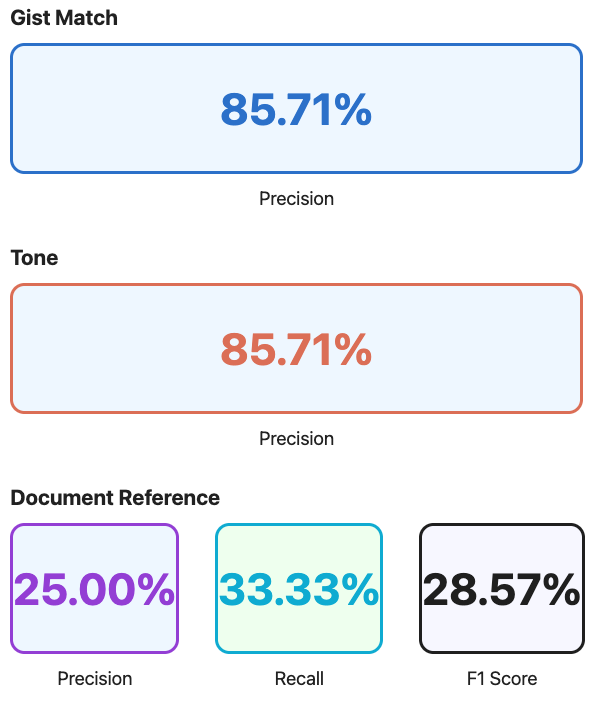
Aggregate score
Running the main python notebook ( found here↗) we can also gain aggregate score metrics. These metrics are traditionally what Data Scientists/ML Engineers would use to evaluate model performance, allowing them to tweak parameters to improve these top level metrics. (For prompt engineering these metrics can be useful to see the impact of tweaking the prompt at a system level, or the impact of altering the RAG process. )
In our case they provide a good overview of the test suite.
Testing Approach: TDD to Test Pyramid
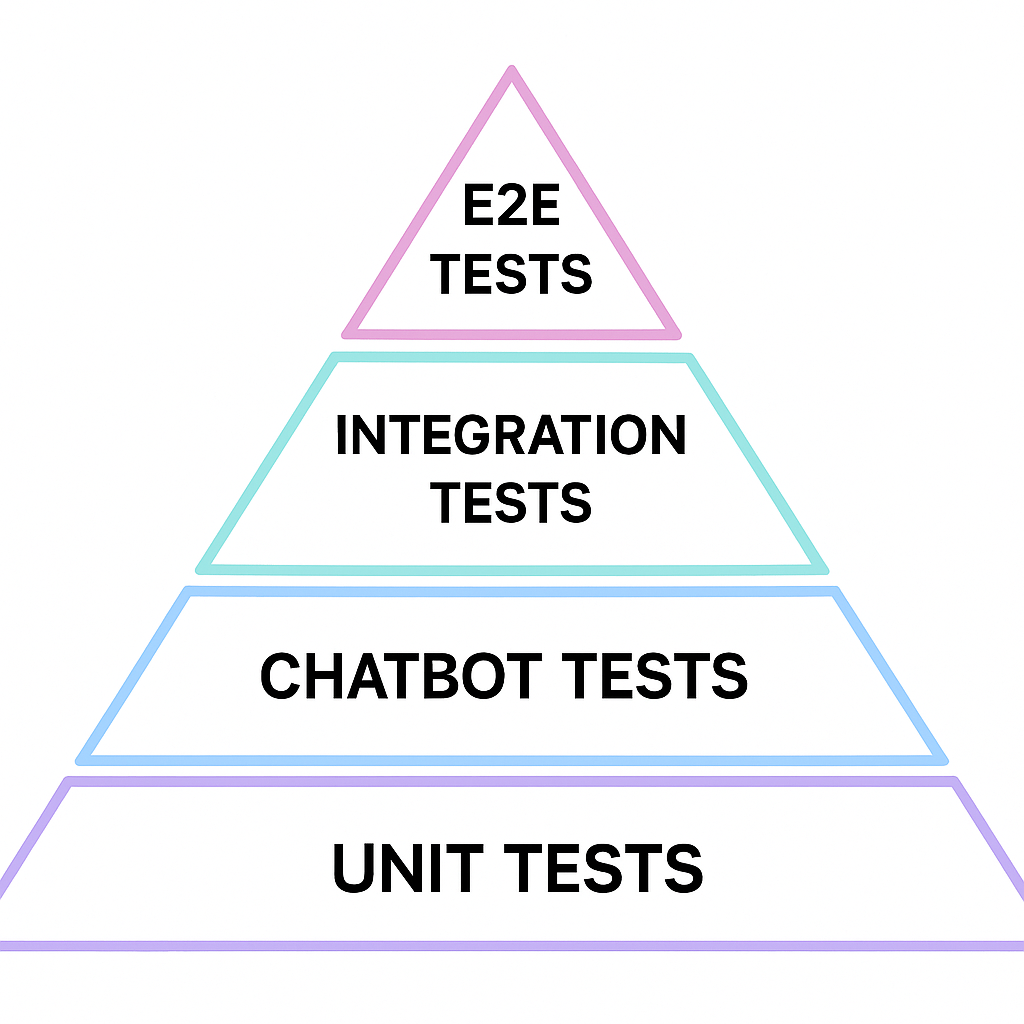
I started this investigation trying to find a way to provide reasonable test coverage for a chat bot and figure out a grander testing strategy. An "LLM as judge" prompt evaluator could be used in place of cypress/playwright tests. Treating the Chatbot "Layer" as its own testing unit, we can define a new testing category.
Test Suite
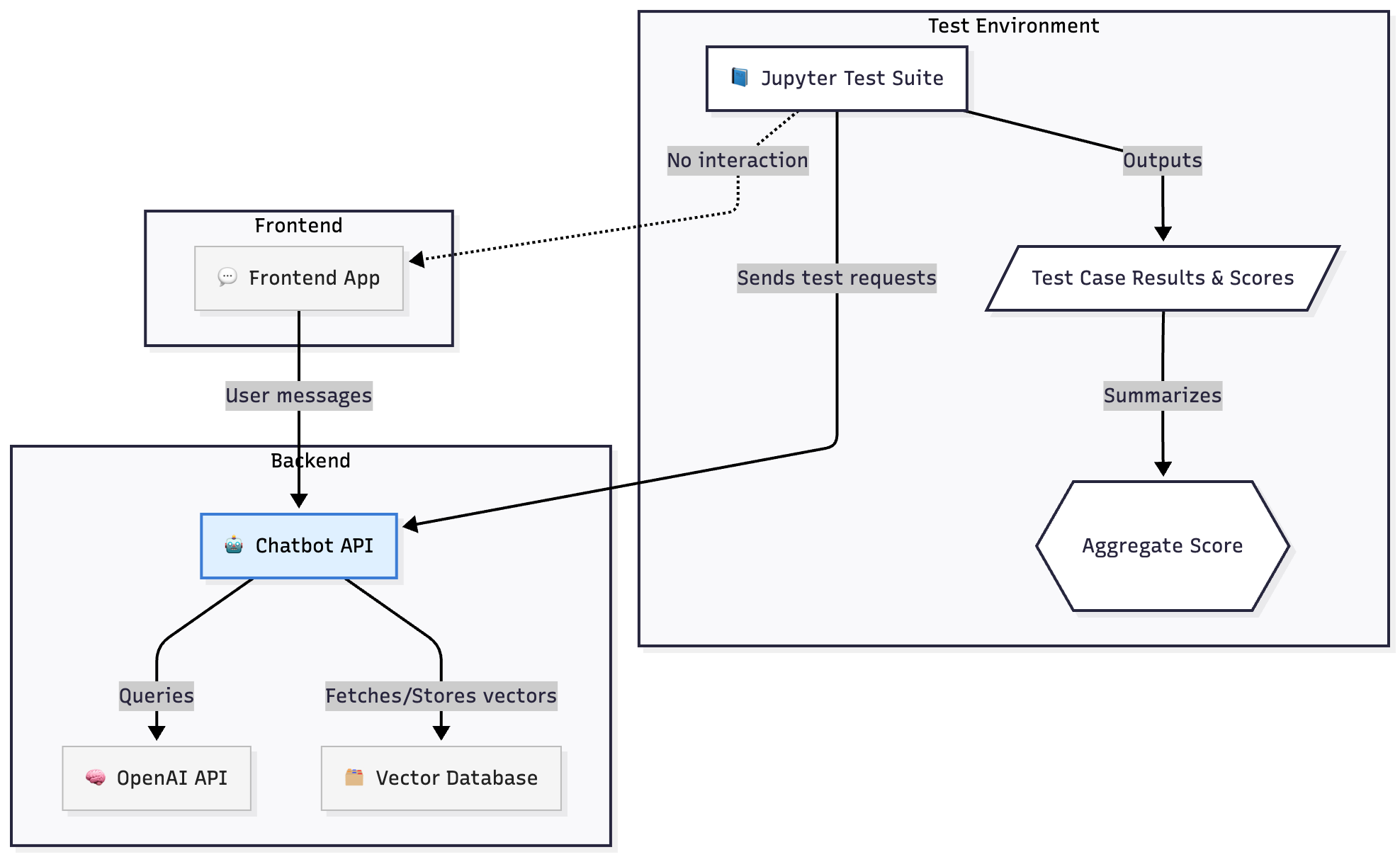
Chatbot tests can be defined in a jupyter style environment and run as part of a CI suite. They can output a report that could be "business human" readable, organised in a similar fashion to BDD tests (by their nature prompts are very readable). In the diagram below, the Chatbot API is defined as its own unit
TDD
It follows then, from this approach, that we can approach Chatbot development using TDD. Acceptance criteria can be converted to tests and implemented in the test suite before the chatbot code is written, iteratively developing a solution and creating a reliable test suite in the process.
Notes
Why Jupyter?
Jupyter is a useful tool for running Python code, and given the domain we are working in, "Data Science", it seemed a relevant tool for the job. It also allows us to leverage tools like MatPlot lib, Numpy, etc, which are very useful when writing code to evaluate model performance (Recall, F1 score)
Limitations Advanced Techniques
The most obvious limitation of "LLM as a Judge" testing strategy, is that LLMs are non-deterministic. In fact this is exactly where we started! And now our test suite is non-deterministic too. QAs abhor a flakey test and now the whole test suite could indeed be described as "flakey": one day a test report scores 90%, the next 70...
A simple mitigation for this issue could be to provide a threshold or tolerance for each test case, allowing for natural variation in the LLM's scoring output, without causing a bit red broken build. This of course doesn't work particularly well with classification scoring (i.e. is the tone right?). A score of true/false or polite/colloquial/rude does not have any tolerance it either passes or it doesn't. The following technique provides a solution to this problem, assigning a weighting to scores, by simply asking the LLM
how confident are you?
G-Eval
How confident is an LLM in its output? It turns out that OpenAI API can provide an answer.
An option is available on the api to embellish a chat completion response with a list of "log probabilities". These represent how likely that token is to be the next token in the list. This allows us to then come up with an average score of how likely the overall response is.
G-Eval is a technique that makes use of these LogProbs in combination with a CoT reasoning (Chain of Thought) approach to produce reliable, and more human-aligned scoring. G-Eval is still an "LLM as Judge" approach but it adds these two extra steps which allow us to create a more consistent and reliable test suite. More detail on the approach can be found in this paper G-EVAL: NLG Evaluation using GPT-4 with Better Human Alignment↗
Log Probabilities
LogProbs can be returned from Open AI's API via a simple parameter addition:
params = {"model": "gpt-4","messages": [{"role": "user", "content": CLASSIFICATION_PROMPT.format(headline=headline)}],"logprobs": True,"top_logprobs": 2,}completion = client.chat.completions.create(**params)
We then receive the following json alongside the normal response.
{"token": "Yes","logprob": -0.00014001218369230628,"top_logprobs": [{"token": "Yes","logprob": -0.00014001218369230628} ...]},
Higher log probabilities suggest a higher likelihood of the token in that context. This allows users to gauge the model's confidence in its output or explore alternative responses the model considered.LogProbs Cookbook↗.
The following example shows the LogProbs for a response to a query about insurance coverage.
LogProbs Scoring
Using "LogProbs" we can weight a given LLM output with its "probability". Weights are calculated by averaging the LogProbs over the generated output text and then be applied to scores via the following approaches:
- When scoring via linear ranges i.e. 1-5 score can be multiplied by the "LogProbs" weight.
- When scoring via boolean classification true/false can be converted to 1/-1 and then multiplied by the "LogProbs" weight
Why is this needed?
G-Eval's use of logprobs allows for better scoring when requesting scores over a given range. Asking "Rate the friendly-ness of this output from 1-5" can often result in the following:
- Return an integer not a decimal
- Lean towards the median value in the range, i.e. 3
Using logprobs compensates for this by caveating the LLM response with a confidence weighting for the returned score.
CoT - Chain of Thought
To be precise, G-Eval is the combination of CoT reasoning and an inspection of LogProbs. CoT here is a technique to provide the LLM with a pathway to an answer. Instead of simply asking for a solution, we ask the LLM first how it might go about solving the problem and then use that plan in the final prompt.
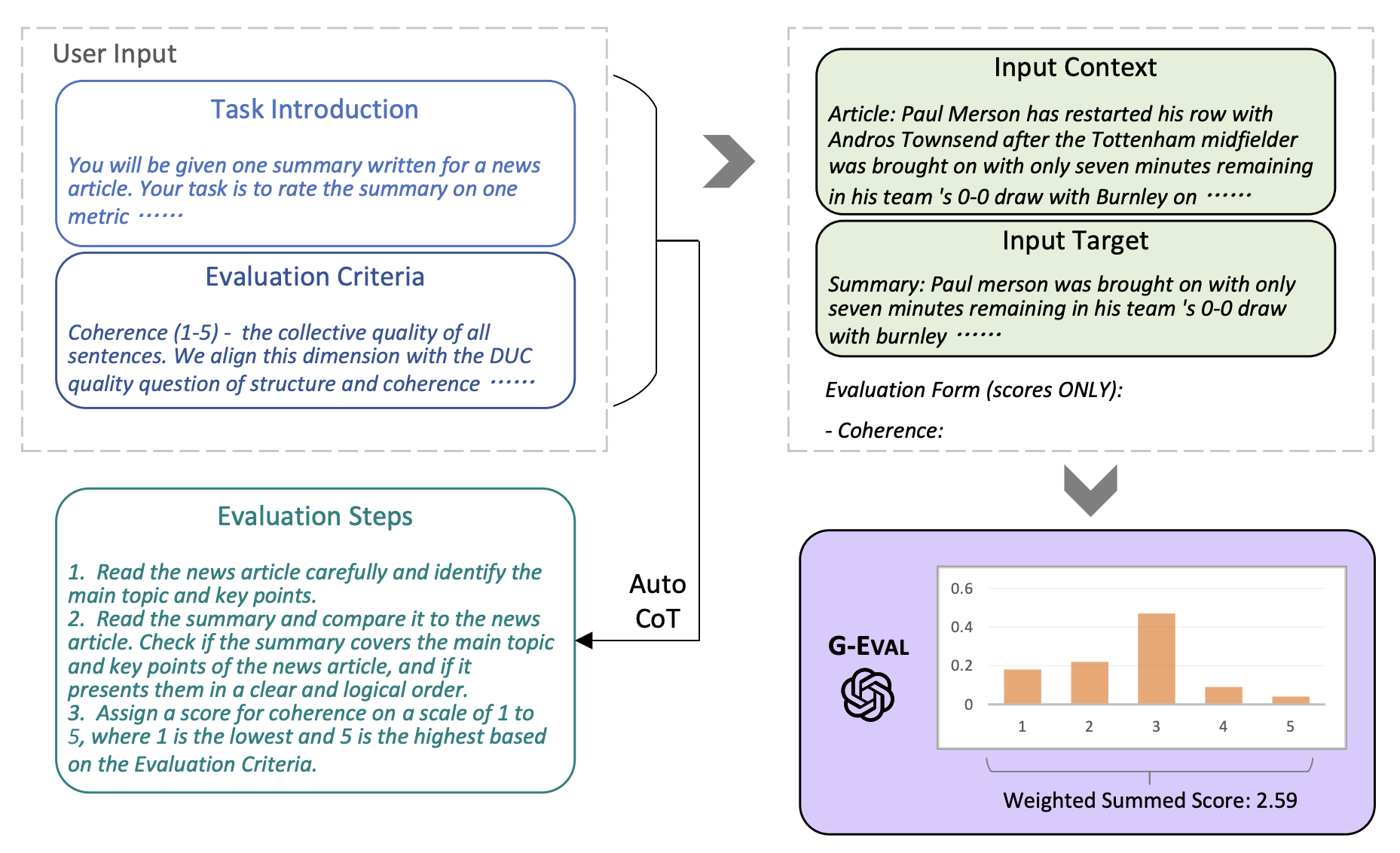
Credit G-EVAL: NLG Evaluation using GPT-4 with Better Human Alignment↗
How to use it?
G-Eval will improve the accuracy of your "LLM as a Judge" approach. G-Eval improves LLM-as-Judge consistency using CoT to allow for structured reasoning and adds probabilistic scoring rather than relying on a variable score. There may however still be some (minor) variance in the output, so I would still recommend a tolerance parameter for each test or the test suite as a whole.
Implementations
DeepEval↗: this library offers an easy pre-made implementation of G-Eval
Final Thoughts
After this investigation "LLM as Judge" would be my preferred testing approach for future projects. It offers a simple, easy to follow process to testing Chatbots and is one that is conducive to TDD.
When it comes to advanced techniques such as G-Eval, I initially thought this technique would be a "nice to have" improvement on a solid foundation.
However seeing how flakey an LLM's judgement on a true/false score can be, its definitley worth utilising G-Eval for scoring. Applying a simple tolerance to your test suite and tweaking as you go is a simple addition to a functioning testing strategy.
A closing message, "Test your Chatbots!", it's not as hard as you think!